About the Cookbook 📖
The Open Connector Cookbook is where Salesforce shares example code and recipes for building with the LLM Open Connector. This blog is generated based on the contents of the open source einstein-platform repository on GitHub.
LLM Open Connector
LLM Open Connector is a way to connect customer and partner LLMs using our existing Bring Your Own Large Language Model (BYOLLM) feature in AI Models (formerly Einstein Studio).
The BYOLLM Open Connector is a commitment to community-driven growth and innovation. By allowing users to integrate any LLM—from those models hosted on major cloud platforms to those models developed in-house—we're opening up a world of possibilities for enhanced, bespoke AI applications.
BYOLLM has built-in support for select models from providers such as OpenAI, Azure OpenAI, Google Gemini, and Anthropic on Bedrock. While these cover a broad swath of the LLM landscape, many high-quality LLMs aren't integrated directly. Instead of building a point-to-point integration with each provider, we've embraced an open connector strategy that scales easily and lets anyone integrate their own LLM with Salesforce.
This capability not only caters to the needs of large enterprises looking to leverage specific models like IBM Granite or Databricks DBRX, but also supports smaller teams eager to experiment with open-source models. With features designed to ensure ease of use, such as a streamlined user experience in AI Models and API specifications closely based on the OpenAI API, this connector empowers our users to enhance their AI-driven applications while maintaining high standards of security and compatibility.
Check out this post on the Salesforce Developers Blog for more info: Use the LLM Open Connector to Build Generative AI Solutions Using Your Preferred Models and Platforms.
Usage
- Clone the einstein-platform repository.
- Implement an HTTP REST service using the LLM Open Connector OpenAPI specification. This service can contain the
chat/completionsendpoint. The/chat/completionsendpoint is used for chat-based use cases.Note: To connect to a remote model endpoint, a standard HTTPS 443 port is required.
- Test your service connection using Bring Your Own Large Language Model (BYOLLM) in AI Models. (Einstein 1 Studio is now called AI Models.)
- Blog post: Bring Your Own Large Language Model in Einstein 1 Studio
- Help content: Bring Your Own Large Language Model
You can now use your LLM from anywhere that can access generative models from AI Models.
FAQs
Have a question that you don't see here? Create a GitHub Issue, and we'll take a look.
Q: Which IP addresses do I need to add to a network Access Control List?
- A: For a list of IP addresses to add to an allowlist, see the BYO Models and Open Connector IP Addresses table in the Salesforce Core Services - IP Addresses and Domains to Allow knowledge article.
Q: What unit of measure should I use for the timestamp?
- Use seconds for The Unix timestamp in the created attribute of the response. If your model endpoint returns a timestamp in milliseconds, you'll need to convert it. For more information, see the specification.
Q: Does the model endpoint URL have to end in /chat/completions?
- Yes, according to the Open Connector specification, a supplied model endpoint must end in
/chat/completions.
Q: Can I use a Bearer token for authentication?
-
Yes, to use a bearer token instead of an API key, enter "Authorization" in the Auth Header field and enter "Bearer
<token>" in the Auth Key field. For example,Bearer 1234567.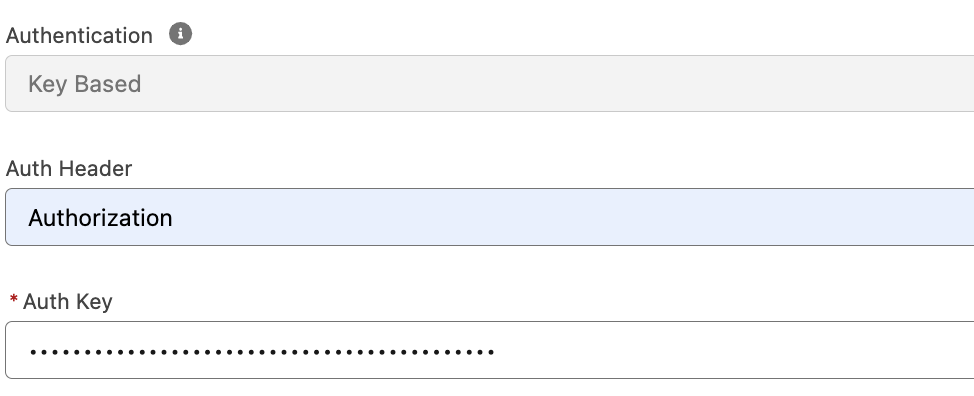
Q: Why am I getting an error for the usage object?
- The Open Connector specification contains slightly different usage object fields compared to OpenAI's API specification. Please use the usage object as defined in the Open Connector specification.
Contributing
Your contributions to the Cookbook and the open-source repository are welcome! Refer to the Contributing Guide and Code of Conduct to get started.
If you like the resources that you see here, consider adding a ⭐ on GitHub. It helps other people discover them!
See Also: